

How it works
From the mailbox you already have to a case you can close.
Nine stages, from installation to resolution. Each one says what ExelProc does on its own and where a person decides.
- 01
Install
YouExelProc does
- Starts with Windows and runs on its own from then on.
- Colleagues reach it in a browser over HTTPS on the office network.
A person does
- Install ExelProc like any program on a Windows computer or server.
- Answer a few setup questions: company name, GSTIN, your email domains. No settings files.
- 02
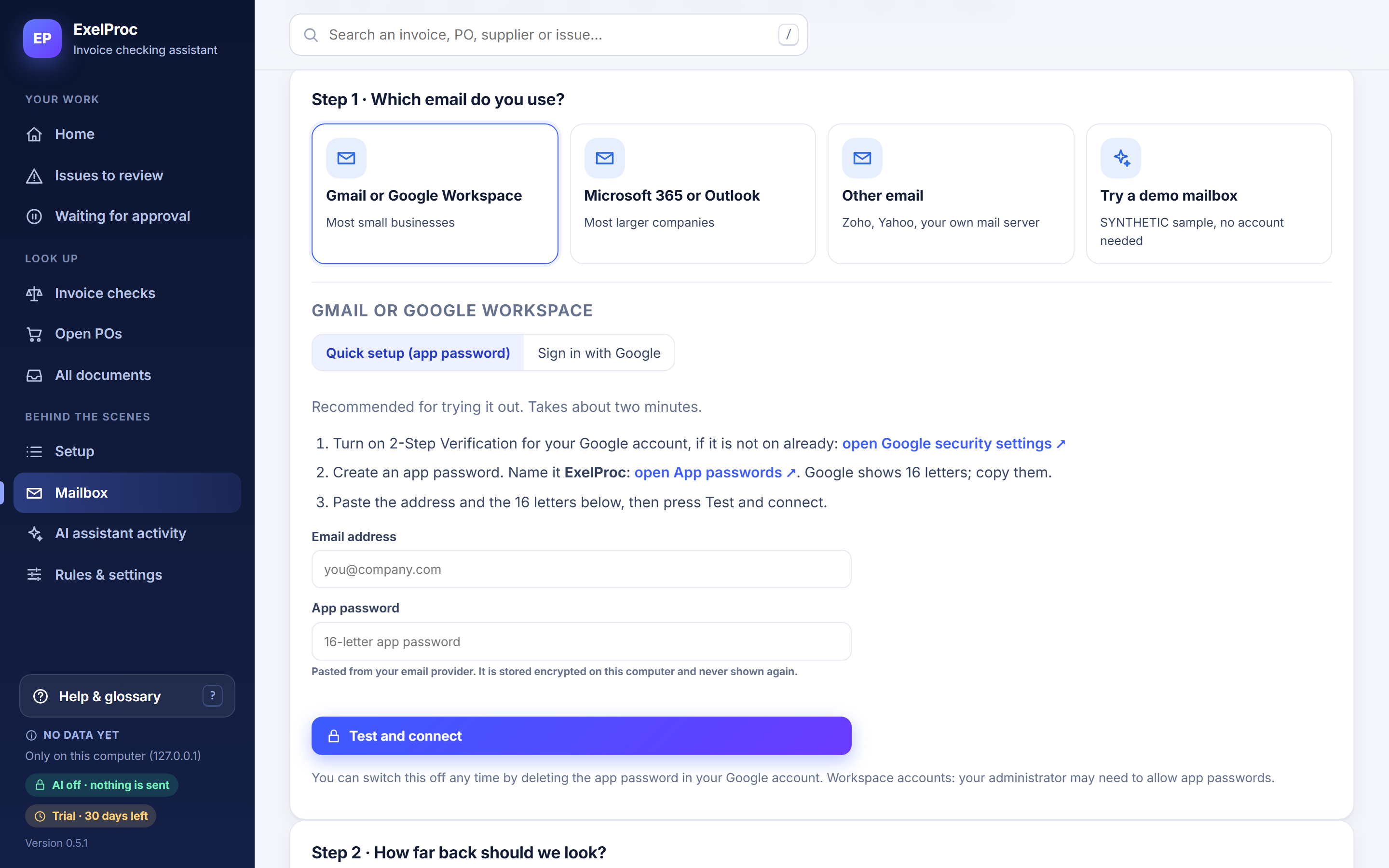
Connect the procurement mailbox
YouExelProc does
- Reads mail only. Never sends, moves, deletes or marks anything as read.
A person does
- Choose Microsoft 365, Gmail or another provider, and grant read-only access.
- Or start with the built-in demo mailbox.
Product screen · demo data Mailbox setup - 03
History check
BothExelProc does
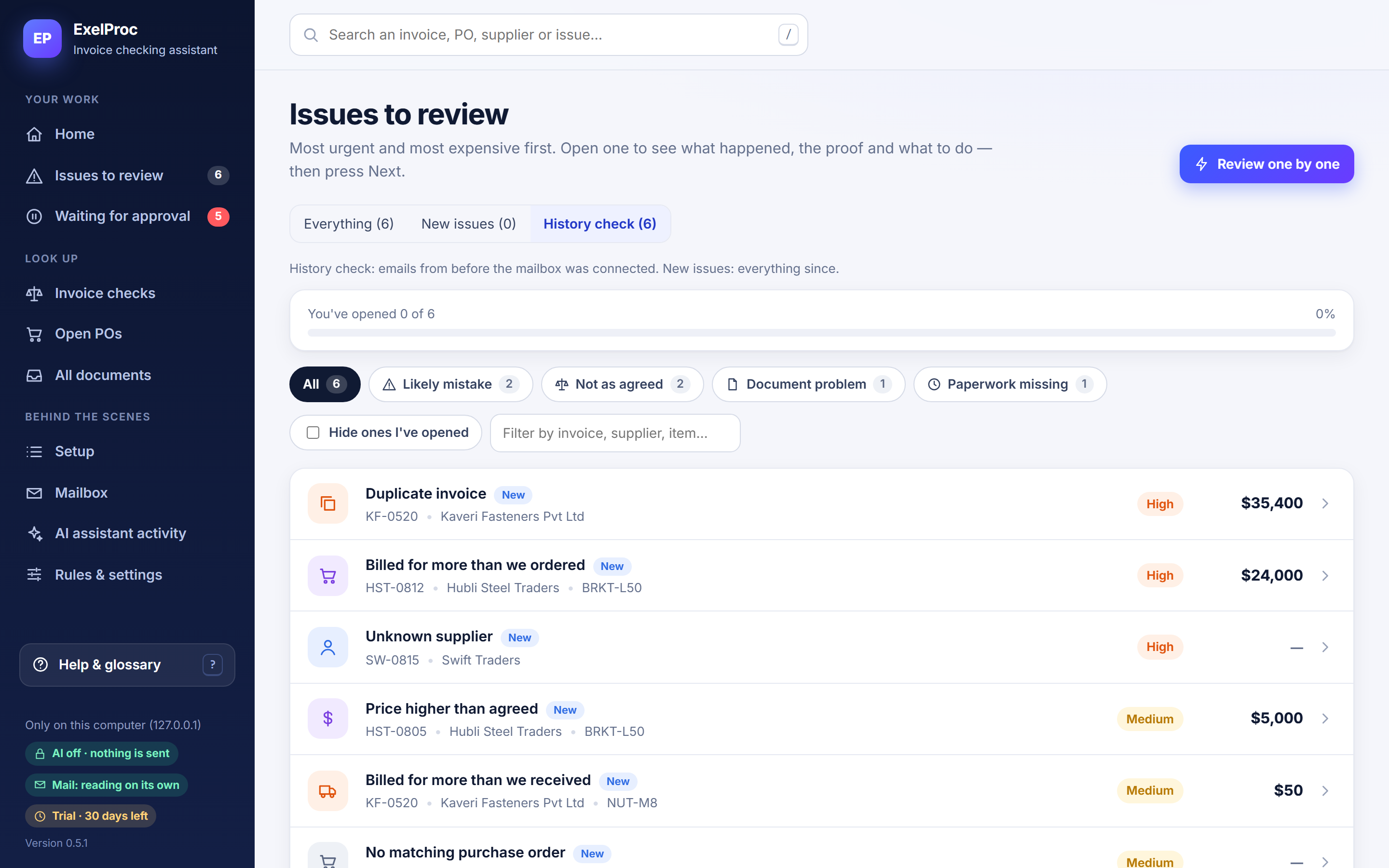
- Reads past email, finds orders, receipts and invoices, and checks every invoice.
- History-check findings are kept separate from new issues so you can review them at your own pace.
A person does
- Choose how far back to look: 6, 12 or 24 months.
Product screen · demo data History check findings - 04
Read and extract
AutomaticExelProc does
- Reads PDFs, spreadsheets and email bodies.
- Known layouts are read by rules. For an unfamiliar layout, AI (if enabled) points to each value; code then checks it against the document.
- Scanned or unreadable files are flagged for a person, never guessed.
- 05
Three-way match, line by line
AutomaticExelProc does
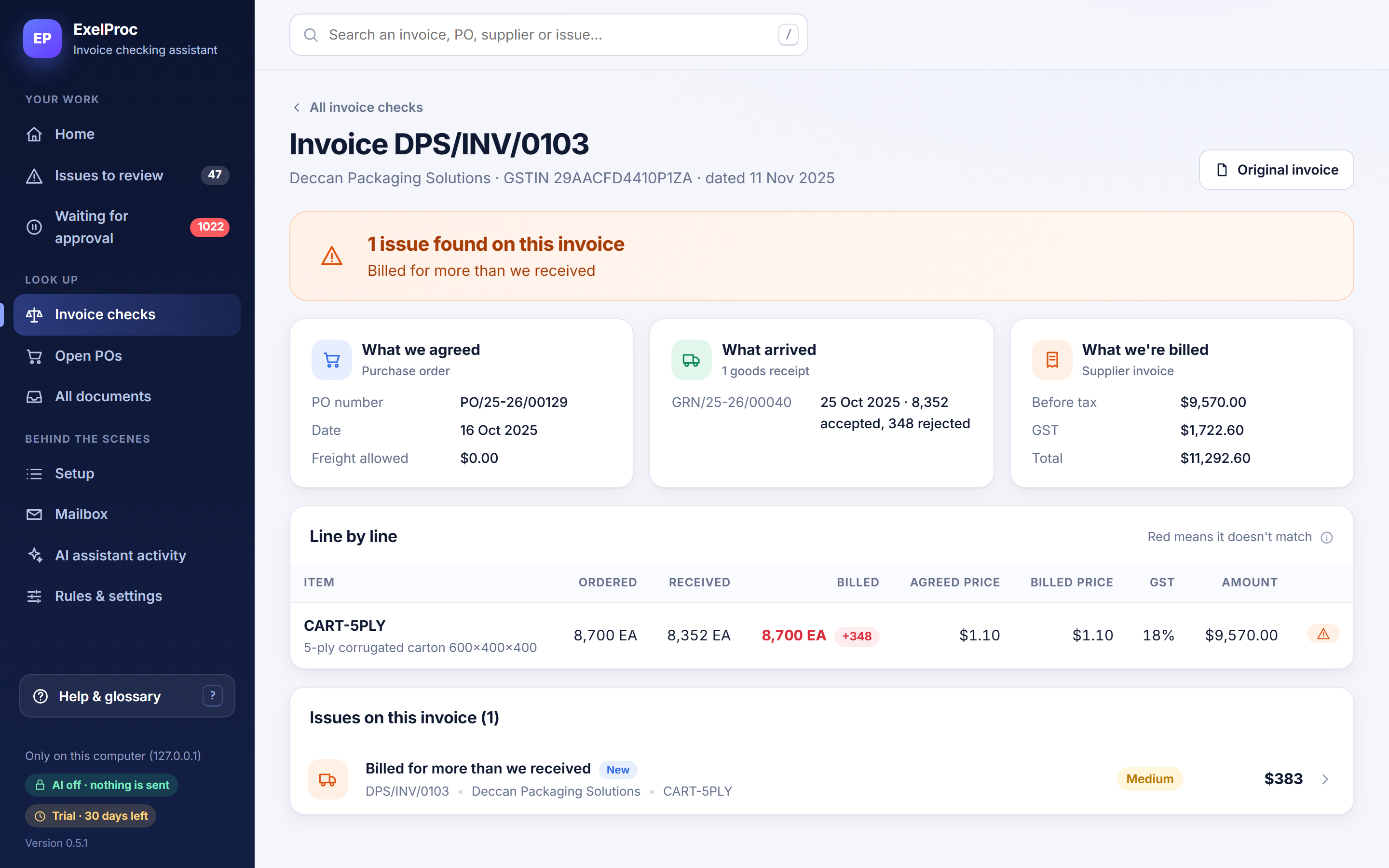
- Matches each invoice line to its order line and accepted receipts.
- Handles partial deliveries, revised POs, credit notes, unit conversions (only by approved rules) and GST: CGST, SGST and IGST.
- Applies your tolerances for price and rounding.
Product screen · demo data Invoice check, line by line - 06
Verify the evidence
AutomaticExelProc does
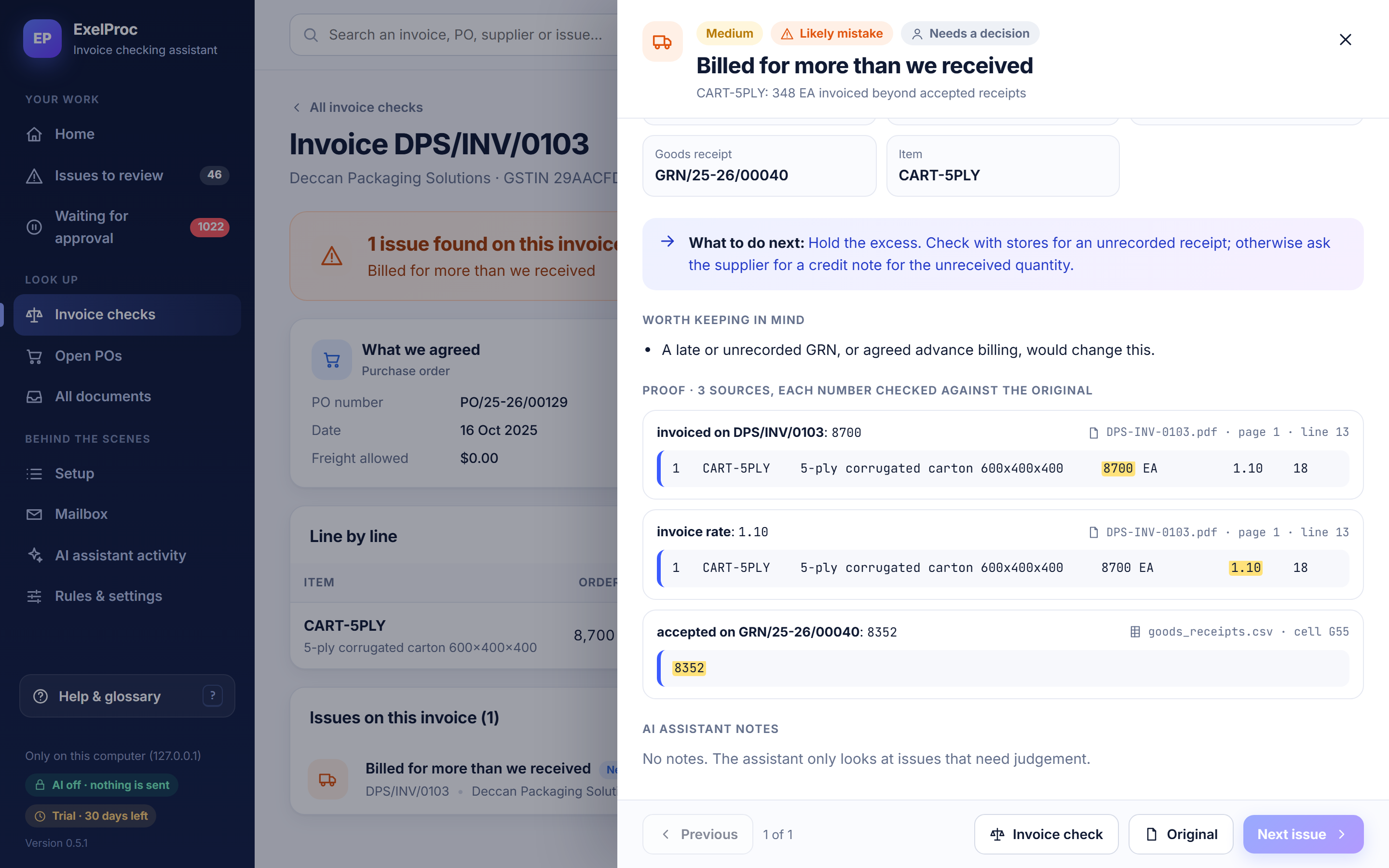
- Every value behind a finding is re-read at its exact location: PDF page and line, spreadsheet cell, email line.
- If any proof fails, the finding is withheld.
Product screen · demo data Proof for every number - 07
Review exceptions
YouExelProc does
- Sorts issues into five categories, most urgent and most expensive first, each with its proof and a next step.
A person does
- Open each issue, check the proof, and decide.
- Accepting a difference above a threshold needs an approver.
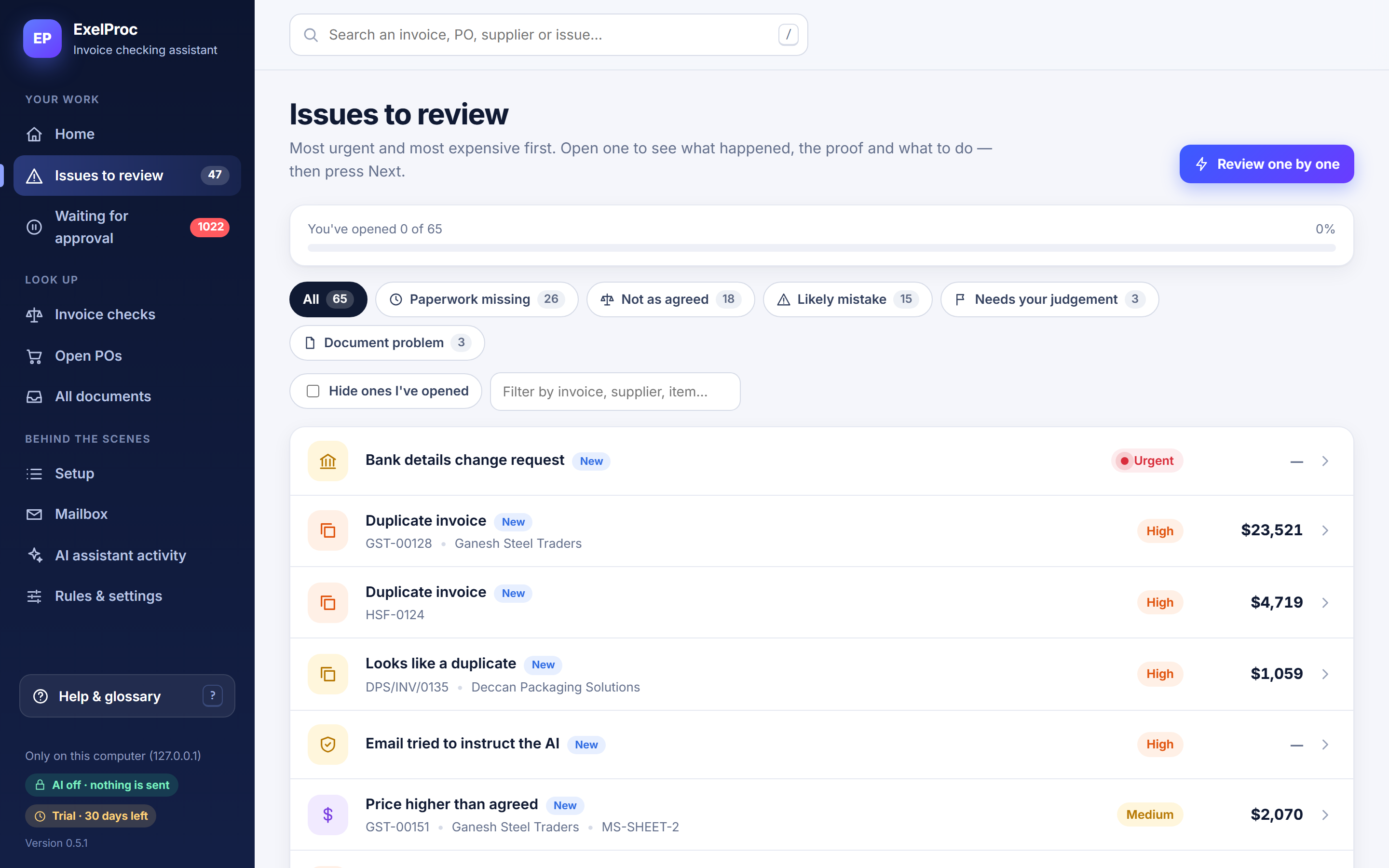
Product screen · demo data Issues to review - 08
Cases, holds and resolution
BothExelProc does
- Opens a case with an owner team and due date.
- Proposes a payment hold by policy and adds it to the Payment holds list (CSV).
- Prepares supplier email drafts for approval.
- Closes the case when a credit note or revised invoice arrives and satisfies the closure rules.
A person does
- Approve drafts, then send them yourself.
- Apply holds in your own payment process.
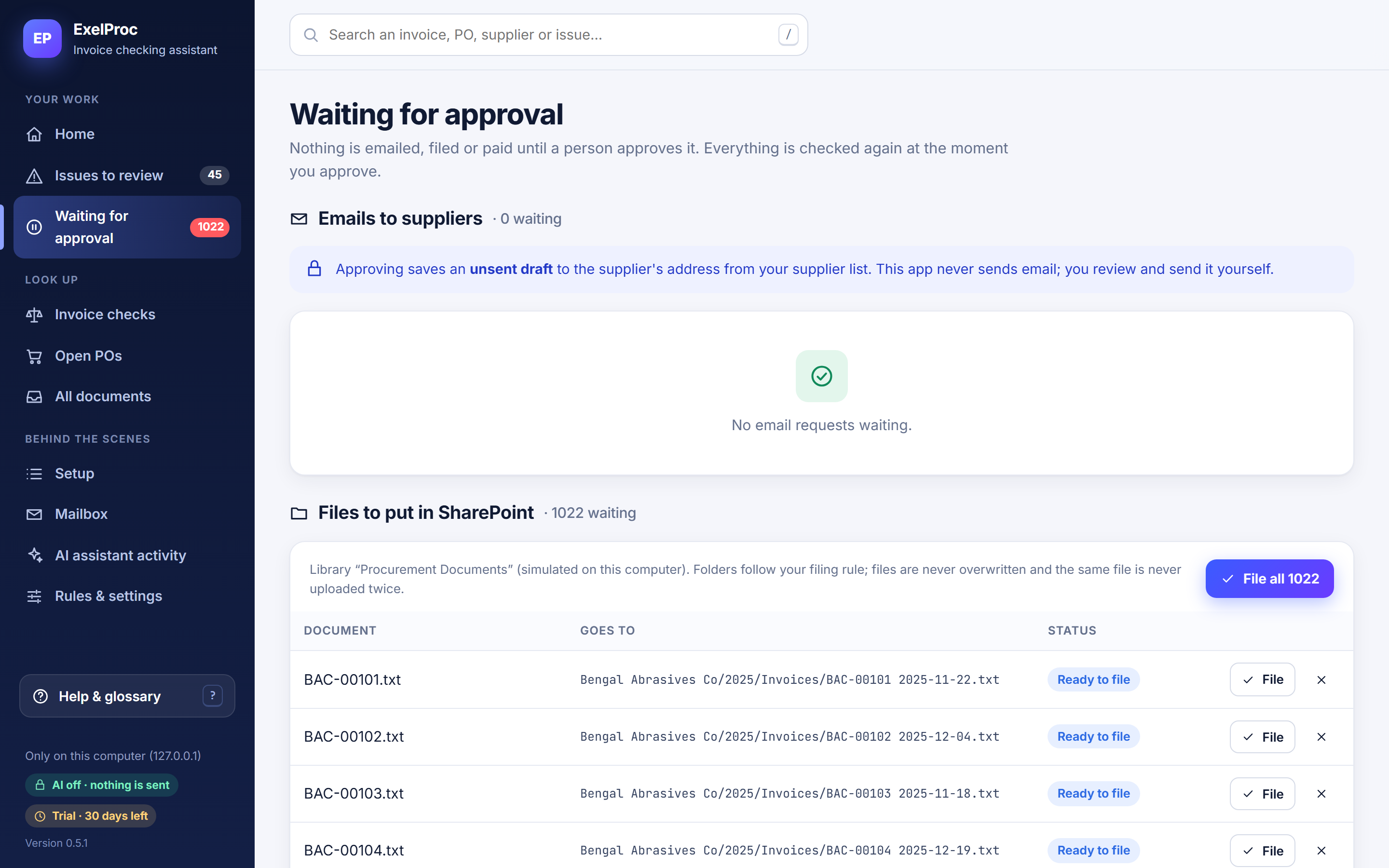
Product screen · demo data Nothing leaves without a person - 09
Recurring checks and daily summary
AutomaticExelProc does
- Checks the mailbox every 10 minutes.
- Prepares a daily summary on the home page, optionally posted to a Microsoft Teams channel.
Interactive investigation
Open the case. Check the working.
One sample invoice, three lines. Open the source of any number and see why each line was—or wasn’t—flagged.
- Source fact, read from a document
- Calculated by ExelProc
- Recommendation for a person
Sample case · fictional supplier
PURCHASE ORDER
PO/24-25/0418
| # | Item | Ordered | Rate | Amount |
|---|---|---|---|---|
| 1 | PMP-40Hydraulic gear pump, 40 cc | 100 EA | $500.00 | $50,000.00 |
| 2 | SFT-25Drive shaft, 25 mm, EN8 | 40 EA | $1,250.00 | $50,000.00 |
| 3 | GSK-80Flange gasket 80 mm | 200 EA | $45.00 | $9,000.00 |
| Freight allowed | $0.00 |
Source file: PO-24-25-0418.pdf
GOODS RECEIPT
GRN/24-25/0773
| # | Item | Accepted |
|---|---|---|
| 1 | PMP-40Hydraulic gear pump, 40 cc | 80 EA |
| 2 | SFT-25Drive shaft, 25 mm, EN8 | 40 EA |
| 3 | GSK-80Flange gasket 80 mm | 200 EA |
Source file: goods_receipts.xlsx
SUPPLIER INVOICE
KMW/INV/2291
| # | Item | Billed | Rate | Amount |
|---|---|---|---|---|
| 1 | PMP-40Hydraulic gear pump, 40 cc | 100 EA | $500.00 | $50,000.00 |
| 2 | SFT-25Drive shaft, 25 mm, EN8 | 40 EA | $1,310.00 | $52,400.00 |
| 3 | GSK-80Flange gasket 80 mm | 200 EA | $45.00 | $9,000.00 |
| Taxable value | $111,400.00 | |||
| IGST 18% | $20,052.00 | |||
| Invoice total | $131,452.00 | |||
Source file: KMW-INV-2291.pdf
Billed for more than was received
Source facts · select one to open its evidence
PO-24-25-0418.pdf · page 1 · line 6✓ value re-read at source
1 PMP-40 Hydraulic gear pump 40cc 100 EA 500.00 50,000.00goods_receipts.xlsx · sheet GRN · cell F212✓ value re-read at source
GRN/24-25/0773 | PMP-40 | accepted | 80KMW-INV-2291.pdf · page 1 · line 9✓ value re-read at source
1 PMP-40 Gear pump 40cc 8413 100 EA 500.00 50,000.00PO-24-25-0418.pdf · page 1 · line 6✓ value re-read at source
1 PMP-40 Hydraulic gear pump 40cc 100 EA 500.00 50,000.00KMW-INV-2291.pdf · page 1 · line 9✓ value re-read at source
1 PMP-40 Gear pump 40cc 8413 100 EA 500.00 50,000.00Calculation
- Invoiced quantityKMW/INV/2291 100 EA
- Accepted on receiptGRN/24-25/0773 − 80 EA
- Invoiced beyond receipt100 − 80 20 EA
- Potential disputed amount20 × $500.00 $10,000
Why it was flagged
- Line matched to PO line: passed. Item code PMP-40 on PO/24-25/0418 line 1
- Unit price vs PO: passed. $500.00 billed = $500.00 agreed
- Quantity vs accepted receipts: failed. 100 billed > 80 accepted across all GRNs for this PO line
- Every value re-read at its source: passed. 3 of 3 values found at the cited page, line and cell
Worth keeping in mind: A late or unrecorded goods receipt, or agreed advance billing, would change this finding.
Recommended next step
Hold the excess. Ask stores whether a later receipt is unrecorded; otherwise ask the supplier for a credit note for 20 EA.
Proposed payment hold Hold $10,000 + 18% IGST ($1,800) = $11,800. The rest of the invoice can be paid.
Price higher than agreed
Source facts · select one to open its evidence
PO-24-25-0418.pdf · page 1 · line 7✓ value re-read at source
2 SFT-25 Drive shaft 25mm EN8 40 EA 1,250.00 50,000.00goods_receipts.xlsx · sheet GRN · cell F213✓ value re-read at source
GRN/24-25/0773 | SFT-25 | accepted | 40KMW-INV-2291.pdf · page 1 · line 10✓ value re-read at source
2 SFT-25 Shaft 25mm EN8 8483 40 EA 1,310.00 52,400.00PO-24-25-0418.pdf · page 1 · line 7✓ value re-read at source
2 SFT-25 Drive shaft 25mm EN8 40 EA 1,250.00 50,000.00KMW-INV-2291.pdf · page 1 · line 10✓ value re-read at source
2 SFT-25 Shaft 25mm EN8 8483 40 EA 1,310.00 52,400.00Calculation
- Billed unit priceKMW/INV/2291 $1,310.00
- Agreed unit pricePO/24-25/0418 − $1,250.00
- Difference per unit1,310 − 1,250 $60.00 (4.8%)
- Potential disputed amount$60.00 × 40 EA $2,400
Why it was flagged
- Line matched to PO line: passed. Item code SFT-25 on PO/24-25/0418 line 2
- Quantity vs accepted receipts: passed. 40 billed = 40 accepted
- Unit price vs PO (tolerance 0.5%): failed. $1,310.00 is 4.8% above $1,250.00
- Every value re-read at its source: passed. 4 of 4 values found at the cited page and line
Worth keeping in mind: A revised PO with the new rate would close this finding automatically.
Recommended next step
Hold the difference. Ask purchasing whether a revised PO or rate agreement exists; otherwise ask the supplier for a credit note or revised invoice.
Proposed payment hold Hold $2,400 + 18% IGST ($432) = $2,832.
Matched: order, receipt and invoice agree
Source facts · select one to open its evidence
PO-24-25-0418.pdf · page 1 · line 8✓ value re-read at source
3 GSK-80 Flange gasket 80mm 200 EA 45.00 9,000.00goods_receipts.xlsx · sheet GRN · cell F214✓ value re-read at source
GRN/24-25/0773 | GSK-80 | accepted | 200KMW-INV-2291.pdf · page 1 · line 11✓ value re-read at source
3 GSK-80 Gasket 80mm 4016 200 EA 45.00 9,000.00PO-24-25-0418.pdf · page 1 · line 8✓ value re-read at source
3 GSK-80 Flange gasket 80mm 200 EA 45.00 9,000.00KMW-INV-2291.pdf · page 1 · line 11✓ value re-read at source
3 GSK-80 Gasket 80mm 4016 200 EA 45.00 9,000.00Calculation
- Billed200 × $45.00 $9,000.00
- Agreed and received200 × $45.00 $9,000.00
- Difference9,000 − 9,000 $0
Why it passed
- Line matched to PO line: passed. Item code GSK-80 on PO/24-25/0418 line 3
- Quantity vs accepted receipts: passed. 200 billed = 200 accepted
- Unit price vs PO: passed. $45.00 billed = $45.00 agreed
- Every value re-read at its source: passed. 4 of 4 values found at the cited page and line
Recommended next step
Nothing to do. This line needs no one’s time.
Proposed payment hold No hold.
Walkthrough
Prefer to watch? Five minutes, start to finish.
For security details, see Security & data control.
Do we need IT to install it?
Installation is like any Windows program. You’ll need someone who can grant read-only access to the mailbox, which is often IT.
Which email systems are supported?
Microsoft 365 / Outlook, Gmail / Google Workspace, and others such as Zoho, Yahoo or your own mail server.
How long does installation take?
A standard Windows install plus a few setup questions. The first History check takes longer the more email you ask it to read (6, 12 or 24 months).
What happens when an invoice has no GRN?
It’s flagged as “Paperwork missing” for Stores and rechecked automatically when the receipt arrives.
Stop checking invoices blindly.
See how ExelProc connects the order, the receipt and the invoice—and proves where the numbers differ.